
Some Tools To Speed Up Those Everyday Tasks
I’m sure like the most of you, you have a lot of usernames and passwords to various accounts and sites, be it wordpress, your hosting, control panels, forums etc. Remembering them all can become a real brain challenge, and you certainly don’t want to use the same username and password for all accounts as it could be a big security flaw if you ever get hacked.
I discovered a few tools that help to remember such things as above, and I’ve lost count at how many of those precious seconds these tools have saved me.
Check out my list of must have tools and firefox addons. I only use firefox so not sure if these are available for chrome , Internet explorer etc.
LastPass
Very popular online password, username, profile storage system. I love this Firefox addon. It remembers all my logins and automatically enters the details when you come to a login page. When you sign up to new sites you can add the details to your last pass vault so you don’t have to enter them next time.
What I really love about last pass is that you can take it with you where ever you go. Just install the LastPass addon to any pc and you have access to all of your account & login details.
Another really cool feature is the automatic form filler. I like to participate in various niche forums for my various sites, signing up to them takes a while, but with LastPass you can just select your profile you want to be used in the forum registration and all of the details will be entered for you. Saving you a lot of time.
Visit Site & DownloadTexter
F*ck me I love this thing! Texter a cool little application that runs in the background and allows you to run string commands to enter text.
For example I could set it up so that if I type ‘IMH’ and hit [Tab] it would type out ‘Internet Marketing Hustle’. So now instead of writing ‘Internet Marketing Hustle’ I just have to type ‘IMH + [Tab]’.
I use this a lot for wordpress html code that I use often in my posts and also for my emails etc. Basically anything that you find yourself typing out often can be shortened into a short string.
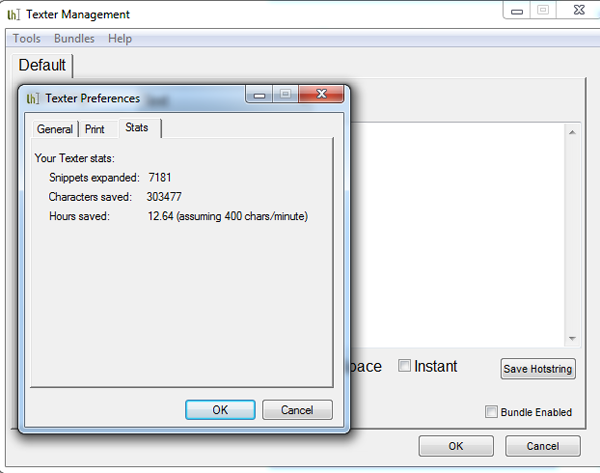
Take a look at my stats from texter, I’ve saved myself 12 hours!!
Pixlr Grabber

I’m always grabbing screenshots of my page to try to explain problems I am having on forums etc. It use to be a pain in the ass having to press [Print Screen] then paste it into photoshop, save it, upload it to photobucket and finally post the link in my comment.
Pixlr Grabber cuts out all the annoyance of taking screenshots by adding the option in the right click menu. You have the option to take a screenshot of the entire page, the visible page, or my favourite, a defined area of the screen. Once you have taken the screenshot you can either save it to your pc, upload it to imm.io or edit it with the browser picture editing feature.
[one_half] [image width=”290″ height=”” link=”https://outsprung.com/blog/wp-content/uploads/2011/12/pixlr-grabber1.png” lightbox=”true” title=””]https://outsprung.com/blog/wp-content/uploads/2011/12/pixlr-grabber1.png[/image] [/one_half][one_half_last] [image width=”290″ height=”” link=”https://outsprung.com/blog/wp-content/uploads/2011/12/pixlr-grabber.png” lightbox=”true” title=””]https://outsprung.com/blog/wp-content/uploads/2011/12/pixlr-grabber.png[/image] [/one_half_last]
Visit Site & Download
[alert]Have you got something that you use every day to speed up your daily tasks? If so please add them below in the comments and I will add them to the list. [/alert]

About the author
Paul Manwaring: This is where we share a thoughts, tips and research into the world of marketing, design and business. Be sure to follow us on Twitter and Facebook.
Would you like to share your thoughts?
Your email address will not be published. Required fields are marked *