
6 Ways To Boost Ecommerce Store Conversions
A well designed and managed ecommerce site will improve your sales and conversion rates. On the flip side, even one poorly designed aspect of a store can turn visitors away. It’s all about engaging your users and offering a helpful, easy to use online experience.
Bringing this optimal online experience to your users requires constant attention and tweaking of your pages. Consistent sales come from a lot of trial and error and even a change in wording or colour can influence your conversion rates.
When running an ecommerce store you want to keep users on your site through engaging content. By that, I don’t mean a well written article, I mean a user friendly page with the correct product images, descriptions etc all the while staying clear of any tactics that will compel a user to leave the site (the dredged bounce rate).
Here are some ways we go about doing this:
Limit The Choices For Visitors

Clutter in every day life is annoying, and it couldn’t be any more true for an ecommerce store. Many of us find it hard to make decisions and when bombarded with many options the task becomes even more difficult. Conversion page experts (myself included) suggest you keep the choices to a minimum, especially on your product pages. Don’t bombard the users with too much information, just give them what is needed. You can break a product page down into these essential elements:
- Call to action; Usually the ‘BUY’ button or something similar.
- Product Image; make sure it’s a high resolution image if you are selling a physical product. Presentation is key.
- Product Description; Keep it brief but make it concise.
- Reviews; a glowing review can sell your product without you having to do much else.
Social Media Plugins Can Boost Your Brand
Don’t bother getting something custom coded, there are a huge selection of excellent social media plugins suited for an ecommerce site. One of the most popular plugins you will see being used on ecommerce sites are the conversation plugins that allow users to talk about a product on their pages.
These plugins allow you to do numerous things but the thing I like most about them is that you can curate users images who are using your product. There are a few services that offer this, Pixlee and Olapic are probably the 2 most widely used.
 Here Lancome use Olapic to curate people images that have used their product, these can be added as a wall or at the bottom of product pages.
This is a great resource of referral traffic and hopefully, glowing reviews if people like your product.
The other essential plugin you need is of course a social sign in. This allows users to sign into your website through a social profile such as Facebook, Twitter etc. Check out a few examples of how social media has impacted large retailers.
Displaying Stock Levels Shows Popularity
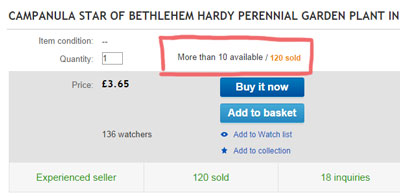
Creating a better visual awareness on a product’s demand can be beneficial. You can do this by showing stock levels on product pages. This can convert visitors by letting them know how popular a product is. I can think of a few times when I have purchased items from Amazon because i knew there were only a few quantity left in stock and didn’t want to wait for it to come back in stock. Also products being close to sold out is usually a good sign, it means the product is popular and likely to be what you are looking for.
For inspiration just take a look at eBay or Amazon who both show stock levels in their own way.
[columns][columns_left]
Amazon
 [/columns_left][columns_right]
eBay
 [/columns_right][/columns]
Use High Quality Product Images
Using low quality images in today’s web standards are a big no-no. It’s almost impossible NOT to take high quality images as almost all new smartphones have good camera’s, some with macro features. Of course if you are selling a physical product you should get it professionally photographed to ensure optimal quality. Product images should be high resolution so the user can zoom in to the product, well lit so they can see all features of the product and on a plain background. If you can’t take pictures of the product yourself ensure that the manufacturers images meet these standards, if they don’t, contact them and request that the pictures be taken professionally.
If you are able to photograph the products in-house ensure that you take images from all angles and if possible place the product in it’s preferred setting for some bonus shots. These unique photographs can be more appealing to your competitors standard images.
Etsy stores are a great example of this and recently I purchased some soap from an Etsy shop and loved the way they presented their product. Take a look below.

Navigation
It should be clear and simple to the user. You not only want to concentrate on your homepage but also make sure navigation is easy on your product pages as this is where most users will be entering.
 When browsing for products be sure to allow the user to filter and sort their results. These are basic functions that are all too often left out in ecommerce sites. I have tested numerous large ecommerce sites and surprised when I’m greeted with a category page without these functions.
The bigger your ecommerce store the better your filtering and sorting should be.
For instance if I was browsing a clothing store I would expect to be able to filter clothes by colour, size, material, style. I have always thought eBuyer have a clean, comprehensive navigation system. Their in-depth filtering on the left of the search pages allow users to pinpoint the exact product specifications they require within their huge inventory. The screenshot above only shows a few filters but scrolling further down the page there are about 10 more filter options. I was able to find a laptop to my exact specifications quite easily.
Allow The User To Contact You Easily
Helpdesk software such as Kayako can be an incredibly powerful tool for the right type of ecommerce store. This software will allow you to connect to a representative of the website and answer your questions. This is most notably used in the web hosting business and while shopping around for my new hosting for this blog I chatted to numerous representatives who were able to quickly answer my queries. It’s really nice to have an answer immediately and gives your company a professional image.
Take a look at Rackspace who have all the contact information you need right at the top of every page. They also offer multiple ways to communicate with them. Just a click of the button and I’m connected with a Rackspace employee who is able to answer my questions.

If your ecommerce store doesn’t need chat software such as this make sure your contact page looks professional and offers the necessary information. Be sure to always use an email address that matches the domain of your website as using something like gmail, hotmail etc can look very unprofessional and could hurt your sales in the long run.
After implementing these changes you are going to want to track and analyse how each are improving your conversion rates. Check out our run down of the cheapest split testing services and think about using a service such as this to help you run split tests on your store.
What tip have you found to increase your conversion rates of your own ecommerce store? Answer in the comments below.

About the author
Paul Manwaring: This is where we share a thoughts, tips and research into the world of marketing, design and business. Be sure to follow us on Twitter and Facebook.
Would you like to share your thoughts?
Your email address will not be published. Required fields are marked *