
5 Essential Tips Learnt From My First Day Using Facebook Ads
In order to start building my email list I decided to advertise my latest ebook using Facebook Ads. Wow was it a big learning curve, this was my first time using paid traffic and while I may have wasted some of my $10 daily budget I did learn a thing or two.
Facebook ads, as well as other advertising platforms are a great way to reach your target audience. If you are just starting out and do not have a huge following, it can be difficult to get your message across. Paid advertising allows anyone with a budget to have their voice heard. Unfortunately too many rush into advertising without knowing how to effectively use the platforms. It’s always best to start out with a small budget, test it until you have it performing well and then gradually scale it with your budget. Here are my top tips for anyone starting out.
The difference between Website Clicks and Clicks
This is something that confused me and I’m sure many others, let me break it down for you:
- Website clicks – These are the stats you want to be paying attention to if you are trying to drive traffic to an external page. For example if you are trying to send traffic to your website (perhaps to capture a lead or make a sale) you want facebook users to click on the link that directs them to your website (hence ‘Website’ clicks).
- Clicks – Basically any form of interaction with your ad counts as a click, it can be broad where these clicks come from, it could be someone liking the ad, commenting, sharing it or clicking on any part of the ad.
There is such a huge difference between these metrics and users can easily be misled by their facebook dashboard in thinking they are receiving lots of clicks to their website, when in fact they are just receiving some sort of engagement with the ad.

As you can see from the screenshot above my clicks and website clicks were massively different. Initially I thought ‘this is great I’m getting so many clicks to my website!’. Then I was bought back down to earth after I discovered these clicks count for any sort of engagement with the ad. All that I got from the $10 was 4 website clicks, but it wasn’t all bad. I gained 20 likes to my page and the ad itself performed well, receiving 82 post likes.
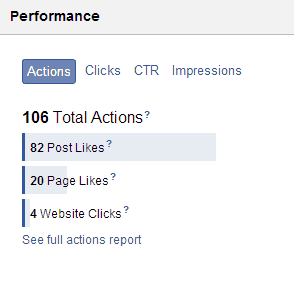 When running your ad campaign be sure to check your performance on the right side of the dashboard, it will give you a breakdown of the engagement with your ad and will give you a good idea where your money is being spent. In another scenario, if I was trying to promote a new article on the blog, post likes would have been great, but for this campaign it’s not what I was going for. So please don’t think I’m saying only website clicks are good, they all have their benefits for different scenarios. Which moves me on to my next tip.
Know exactly what you want to get out of your campaign
Ask yourself ‘why exactly am I starting this campaign?’ and ‘what do I want to get out of it?’. I setup my ad campaign with the rough aim to drive traffic to my external page but I didn’t think it through any deeper than that. What do you want your users to do? Buy something, submit their details, share something…..once you target exactly what you want your users to do you can better target that audience in Facebook and choose the appropriate type of ad. Better targeting and ad placement will result in better click-through and conversion ratios and less money wasted on actions you don’t want viewers to do.
Setup a conversion pixel
 Once I spent a few minutes reading and understanding how this worked I couldn’t believe I didn’t implement this into my campaign. The idea behind a tracking pixel is to track the end result you want to achieve. So an example of where to put the tracking pixel could be on a ‘thankyou for subscribing’ page, which users would open once they had subscribed. Be sure to choose a page that normal visitors will not come across so it does not throw off the statistics in Facebook. Some people have reported differences between facebook reporting and other platforms such as Google Analytics. From my own experience I have also noted this. My InstaPages account has shown 7 conversions since starting my 1 day campaign however Facebook is yet to show one conversion.
Test the waters with right column ads
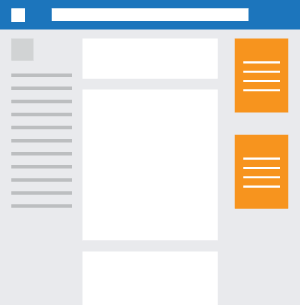 When I first setup my ad campaign I selected both news feed ads and right column ads. What this meant was that while my reach was greater, it also meant I was paying for the interaction clicks that come with the ad being on the newsfeed (liking, commenting etc) which was something I didn’t want from this campaign.
As I talked about in my first point, clicks and website clicks are entirely different, if you are looking to bring traffic to your external site then you don’t really care too much about clicks. It is website clicks you want to pay attention to.
The way I will now approach it is as follows:
- Create ads
- Place in right column
- See how my audience reacts to them
- Only when I have good click through and conversion ratios will I move over to newsfeed ads to broaden my reach.
You should see right column ads as a way to test the waters, you know you wont be wasting money as all the clicks registered will be going to your site.
Stick to the 20% rule when creating your images
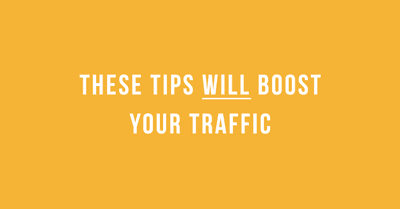
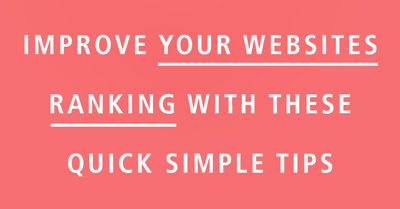
I created about 10 images to use on my campaign, I loaded up photoshop and made different variations of text and colours, loaded them into Facebook Ads only to see them not approved. It turns out Facebook will not approve images where more than 20% of the image is text. Be sure to keep this in mind when designing, or paying someone to design your facebook ads.
[columns]
[columns_left]
Approved
[/columns_left]
[columns_right]
Not Approved
[/columns_right][/columns]
So there you have it, 5 essential tips every newbie to Facebook ads should follow. I’m sure there are more and I’m positive I will come across more on my journey. A guide that has been HUGELY educational for myself is the Facebook Marketing: A Step-by Step to your first 1000 Fans! on Udemy, grab yourself a copy too and join us in the classroom.
Please share what you have discovered while using Facebook ads in the comments below.

About the author
Paul Manwaring: This is where we share a thoughts, tips and research into the world of marketing, design and business. Be sure to follow us on Twitter and Facebook.
Would you like to share your thoughts?
Your email address will not be published. Required fields are marked *